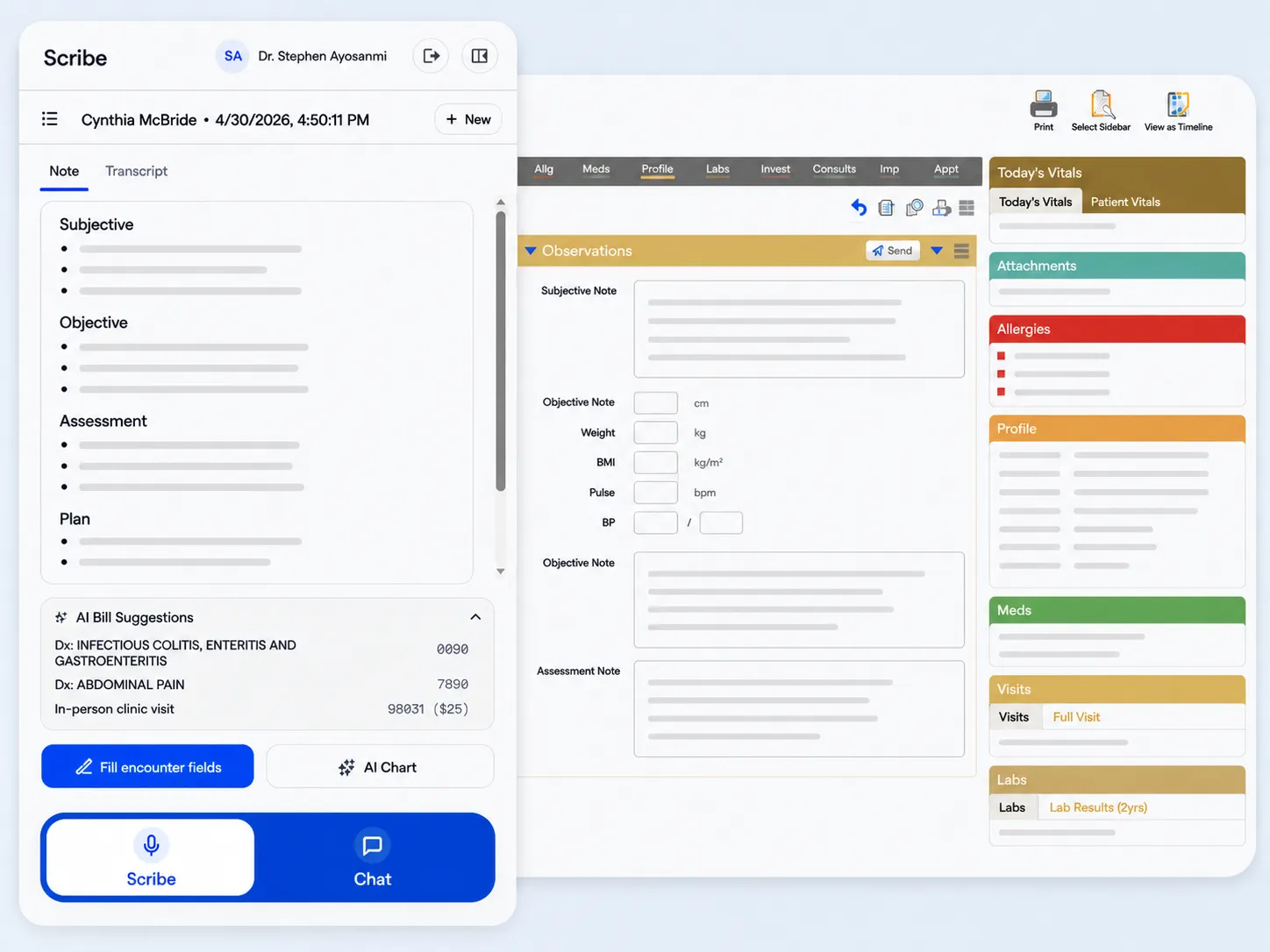
Medulla opens as a drawer right on your Med Access encounter page. It
scribes the visit, keeps the chart current, suggests billing codes,
and files each part of the note into your template's own fields in
one click. Nothing to ask TELUS to enable.
“I have all my work done by the end of my day, which is
unprecedented.”
Dr. Toye Oyelese · Medical Director, Westside Medical Associates ·
Kelowna, BC
Built for the Med Access encounter page
Sound familiar?
You got an AI scribe. You kept the busywork.
The first wave of AI scribes saved some typing and added a second job, babysitting the tool. If your day still ends with checking, copying, and matching notes to charts, this is why.
The bolted-on way
Lives in a separate tab you feed each visit into, leaving a pile of notes to match back to the right charts at day's end.
Hands you a draft you re-read line by line, because you cannot be sure what it heard.
Even the ones that write back dump the whole note into your template's first field and leave the sorting to you.
Its AI chat has never seen the chart, so the advice stays generic no matter how much you paste in.
Billing still gets coded from memory after your last patient.
The Medulla way
One drawer on the Med Access encounter page. The note is bound to the open chart, so it can never land on the wrong patient.
Concise, accurate notes most of our clinicians sign on the first pass.
Fills your Med Access template field by field: Subjective, Objective, Assessment, and Plan each land where they belong.
Clinical answers grounded in the patient in front of you, cited to Canadian sources.
Diagnostic and billing codes suggested at sign-off, from what was actually discussed.
Medulla works inside Med Access, on the encounter you already have open.
“We are 19 family doctors, most of us came in as Tali users.
I wasn't expecting to be won over.
It quietly gives you time back without getting in your way.”
Dr. Saad Khan
Westside Medical Associates · Kelowna, BC
Made for Med Access templates
Your note lands in the template, field by field.
Med Access encounter templates split the note into fields: Subjective, Objective, Assessment, Plan. Other scribes that claim to fill your encounter dump the whole note into the first box and leave the splitting to you. Medulla places each part of the note into its own field, exactly where you would have put it, in one click.
Encounter · Med Access
Medulla · Your note
Subjective
Eye ache and pressure when working too close to the screen. Symptoms occur without glasses.
Objective
Fundoscopic exam: retina appears normal. Visual screening performed for each eye.
Assessment
Eye strain and refractive error, likely outdated prescription glasses.
Plan
Referral to ophthalmology for refraction and comprehensive eye exam.
Fill encounter fields
Observations
SOAP template
Subjective Note
Eye ache and pressure when working too close to the screen. Symptoms occur without glasses.
Objective Note
Fundoscopic exam: retina appears normal. Visual screening performed for each eye.
Assessment Note
Eye strain and refractive error, likely outdated prescription glasses.
Plan
Referral to ophthalmology for refraction and comprehensive eye exam.
It is the difference between signing off and spending your evening re-sorting a wall of text, thirty times a day.
From hello to signed-off note, without leaving Med Access.
01
Open Medulla on any Med Access encounter
The drawer slides in alongside the patient chart. No new tab, no new app to switch into, and nothing for TELUS to enable.
02
In person or on the phone
Medulla scribes the visit, charts what was discussed, suggests billing codes, and answers your clinical questions.
03
Notes go straight into Med Access
One click fills your encounter fields, each part of the note in its own template field. Done before the patient stands up to leave.
The whole visit
One drawer, working the whole encounter.
From the first two minutes to sign-off, Medulla handles it while you
stay with your patient.
01 · AI Insight
Every patient, fresh in your mind.
The moment you open the encounter, AI Insight reads the chart and
hands you the patient's story: what you covered last time, what
matters now, with priorities like overdue screenings surfaced
automatically. Nothing to gather, nothing to upload.
Encounter · your EMR
Medulla
Scribe
AA
Hide
Esc
AI Insight
Patient story
68F, seen three weeks ago after a fall. Type 2 diabetes and hypertension
on the chart. Last A1C 8.2%, trending up. Statin started in March,
adherence unclear. Diabetic foot exam overdue.
Suggested priorities
Foot exam overdue
A1C trending up
Recheck BP
Synthesized from the chart automatically. Nothing to upload.
Scribe
Ask
02 · AI Scribe
The note is written before the visit ends.
An accurate transcript streams live while you stay with the patient.
Tap finish and a concise SOAP note is written in seconds, ready to
review while the patient is still in the chair. It gets your accent
the first time, and most of our clinicians sign off on the first
pass.
“It summarizes the pertinent information and removes the
extraneous. It definitely increases my efficiency and allows me to
focus on the patient's care and management.”
Dr. Franky Mah · Sahali Mall Medical Clinic · Kamloops, BC
Encounter · your EMR
Medulla
Scribe
AA
Hide
Esc
NoteTranscriptPatient Handout
Subjective
Sore throat and low-grade fever, three days
No cough or shortness of breath
Painful swallowing, worse in the morning
$
AI Bill Suggestions
Dx: Acute pharyngitis462
In-person clinic visit98031
Fill encounter fields
AI Chart
Scribe
Ask
03 · Ask
Clinical answers that already know your patient.
Drug interactions, differentials, dosing, and guideline lookups,
grounded in the chart in front of you and cited to Canadian sources
like Choosing Wisely Canada and your province's guidelines. No
pasting chart details into a consumer chatbot.
Encounter · your EMR
Medulla
Ask
AA
Hide
Esc
Safe to start an ACE inhibitor here?
Reasonable. Her last labs show eGFR 58 and K+ 4.9, both within range to
start low and recheck in one to two weeks. Watch the overlap with her
current NSAID.
Choosing Wisely Canada
Her chart: eGFR 58, K+ 4.9
Encrypted and PIPEDA compliant.
Scribe
Ask
04 · AI Autochart
The chart updates itself. You just say yes.
The note is only half the work. Medulla proposes the problem-list
additions, medication changes, care-plan items, and follow-ups the
visit calls for, each one a checkbox. Accept what fits and every item
is written into Med Access at once, instead of a field at a time
through tabs and modals.
Encounter · your EMR
Medulla
Scribe
AA
Hide
Esc
AI Chart
3 items
Accept all·Discard all
Medical
Essential hypertension
Preferences
Lisinopril renewed
Care plan
Follow up in 3 months
Add to patient chart (2)
Scribe
Ask
05 · AI Billing Assistant
Stop coding from memory at the end of the day.
As you finish, diagnostic and service codes appear beside the note,
grounded in what was actually discussed and your province's fee
schedule. Give them a look, apply, and the codes go in with the note,
so you bill for the work you actually did.
Encounter · your EMR
Medulla
Scribe
AA
Hide
Esc
$
AI Bill Suggestions
BC · MSP
Dx: Type 2 diabetes mellitus250
Dx: Essential hypertension401
In-person clinic visit98031
Grounded in this visit.
Assessment
Diabetes and hypertension, both stable on current therapy. A1C reviewed
and at target.
Fill encounter fields
Codes go in with the note.
Scribe
Ask
06 · Telehealth
Patients see your clinic's number, not your cell.
Set your clinic number once and every phone visit goes out under your
clinic line, a local number patients recognize and answer. The
patient's number is already on the chart, so you click to call, and
the visit is scribed like any other. The note is done by hang-up.
Encounter · your EMR
Medulla
Scribe
AA
Hide
Esc
Call Margaret D.
Number pulled from the chart.
Patients will see
(902) 555-0142
Your clinic line · local
Set Caller ID
Patient's phone number
(250) 284-5578
1 2 3 4 5 6 7 8 9 * 0 #
Call
Scribe
Ask
See it on your Med Access
Documentation done before the next patient walks in.
Start your free trial and see it work on your own encounters.
No. There is nothing to toggle on your end, and no need to loop in your MOA or contact TELUS to switch anything on. Install the Medulla extension, sign in to Med Access, sign in to Medulla, and you are ready to go.
Does Medulla fill Med Access encounter templates properly?
Yes, field by field. If your encounter uses a template like SOAP, Medulla splits the generated note and places each part into its own field: Subjective, Objective, Assessment, and Plan land exactly where they belong. It never dumps the whole note into the first box and leaves the sorting to you.
Does it change our clinic's shared Med Access setup?
No. Medulla runs just for you, only when you are signed in. It does not change the shared EMR or touch anyone else's setup, so your colleagues are not affected and there is nothing you need to tell them. If they want it too, you can invite them from inside Medulla, and they add Medulla to their own login the same way. See how to invite a practitioner.
I work at more than one clinic. Does Medulla come with me?
Yes, on one account and one subscription, with nothing needed from anyone else at either clinic. Add each practice under Settings, connect Med Access at each one, and switch between them from your profile. There is no separate Medulla account per location. See how to work across multiple practices.
Do I have to change how I work?
No. Medulla opens as a drawer alongside your patient chart, inside the Med Access you already use. No new tab, no new app, and no re-learning your workflow.
Do I have to correct the note afterward?
Most of our clinicians sign off on the first pass. The note comes out concise and ready to send straight to the chart, and you always review before it goes in. You stay in control; you are just not rewriting from scratch.
Whose number do patients see when I call them?
Your clinic's. Set your caller ID once and every phone visit goes out under your clinic line, so patients see a local number they recognize instead of your personal cell. Medulla can also provide a local number to call from.
Can I wear earphones during a phone visit?
Yes. Unlike other AI scribes, Medulla phone visits work perfectly with earphones. We encourage clinicians to use them for maximum privacy with their patients.
Is patient information secure?
Yes. Medulla is built and hosted in Canada and is PIPEDA compliant, so patient data stays in the country and never gets pasted into consumer AI tools. Everything is encrypted in transit and at rest. Read our privacy notice.
How much does it cost?
Plans start at CAD $59 per clinician a month billed annually, and every plan begins with a 1-month free trial, no credit card required. See full pricing.
Which clinicians is Medulla built for?
Medulla is optimized for primary care and longitudinal settings, where you see the same patients over time and their history matters. That means family physicians, nurse practitioners, and the primary care teams they work alongside. If you carry a panel of patients in Med Access, Medulla was built for you.